“What gets measured gets managed.” For AI security, choosing the right metrics is crucial—measure the wrong things and you’ll optimize for false confidence. This guide covers the metrics that actually matter for AI security and how to use them effectively.
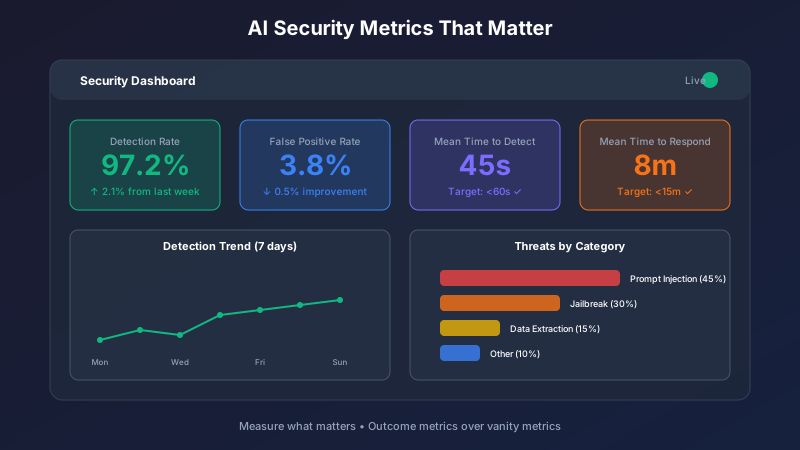
The Metrics Hierarchy
Not all metrics are equally valuable. Organize your metrics by their purpose:
| Level | Purpose | Example |
|---|---|---|
| Outcome | Business impact | Security incidents prevented |
| Leading | Predict future state | Threat detection rate |
| Activity | Track operations | Logs collected per day |
| Vanity | Look good (avoid) | Total requests processed |
Focus on outcome and leading indicators; activity metrics support investigation.
Essential AI Security Metrics
Threat Detection Metrics
Detection Rate
- What: Percentage of attacks detected
- Target: >95% for known patterns
- Formula:
Detected Attacks / Total Attacks * 100
False Positive Rate
- What: Percentage of alerts that are false alarms
- Target: <5%
- Formula:
False Alerts / Total Alerts * 100
False Negative Rate
- What: Percentage of attacks missed
- Target: <1% for critical attacks
- Formula:
Missed Attacks / Total Attacks * 100
Mean Time to Detect (MTTD)
- What: Average time from attack start to detection
- Target: <1 minute for automated detection
- Formula:
Sum(Detection Time - Attack Start) / Attack Count
Response Metrics
Mean Time to Respond (MTTR)
- What: Time from detection to containment
- Target: <15 minutes for critical incidents
- Formula:
Sum(Containment Time - Detection Time) / Incident Count
Containment Effectiveness
- What: Percentage of incidents successfully contained
- Target: >99%
- Formula:
Successfully Contained / Total Incidents * 100
Recovery Time
- What: Time to restore normal operations
- Target: <1 hour for most incidents
- Formula:
Sum(Recovery Time - Containment Time) / Incident Count
Quality Metrics
Guardrail Compliance
- What: Percentage of outputs meeting safety standards
- Target: >99.9%
- Formula:
Compliant Outputs / Total Outputs * 100
Policy Violation Rate
- What: Rate of policy violations per 1000 requests
- Target: <1 per 1000
- Formula:
Violations / Requests * 1000
Safety Score
- What: Composite safety rating
- Target: >95/100
- Components: Weighted average of sub-metrics
Building Security Dashboards
Executive Dashboard
Show high-level security posture:
Key Visualizations:
- Overall security score (single number)
- Incident trend (7-day sparkline)
- Risk heatmap (by category)
- SLA compliance (percentage)
Update Frequency: Real-time with daily summary
Operations Dashboard
Support day-to-day security operations:
Key Visualizations:
- Active alerts (count and severity)
- Detection timeline (last 24 hours)
- Top attack types (bar chart)
- Response time trends (line graph)
Update Frequency: Real-time
Compliance Dashboard
Support audit and compliance needs:
Key Visualizations:
- Policy compliance rates
- Audit trail completeness
- Control effectiveness
- Certification status
Update Frequency: Daily with monthly summaries
Metric Calculation Examples
Calculating Detection Rate
Method:
- Define “attack” clearly (what counts?)
- Track total attacks (detected + missed)
- Track detected attacks
- Calculate ratio
Challenges:
- How do you know what you missed?
- Use red team exercises to estimate
- Compare against industry benchmarks
Calculating False Positive Rate
Method:
- Log all alerts generated
- Track which were true positives
- Remaining are false positives
- Calculate ratio
Considerations:
- Requires classification of all alerts
- May need sampling for high-volume systems
- Track trends, not just absolute numbers
Common Pitfalls
Vanity Metrics
Metrics that look impressive but don’t indicate security:
| Vanity Metric | Why It’s Misleading | Better Alternative |
|---|---|---|
| Total requests blocked | Includes noise and duplicates | Unique attacks blocked |
| Uptime percentage | Doesn’t indicate security | Incident-free days |
| Logs collected | Volume ≠ security | Coverage percentage |
| Rules deployed | More isn’t better | Detection effectiveness |
Gaming Metrics
When metrics become targets, they get gamed:
Example: If you measure “alerts resolved,” teams close alerts without investigation.
Solution: Pair with quality metrics like “alerts correctly classified.”
Snapshot Bias
Point-in-time measurements can be misleading:
Example: 100% compliance today may hide yesterday’s violations.
Solution: Track trends and time-series data, not just current state.
Benchmarking
Internal Benchmarks
Compare against your own history:
- Week-over-week trends
- Month-over-month improvement
- Incident patterns by time
- Performance by system/team
External Benchmarks
Compare against industry standards:
| Metric | Industry Average | Best-in-Class |
|---|---|---|
| Detection Rate | 70-80% | >95% |
| False Positive Rate | 10-20% | <5% |
| MTTD | Hours | Minutes |
| MTTR | Days | Hours |
Implementation Checklist
Metric Selection
- Outcome metrics identified
- Leading indicators defined
- Vanity metrics avoided
- Calculation methods documented
Data Collection
- Data sources identified
- Collection automated
- Data quality verified
- Retention policies set
Dashboards
- Executive dashboard built
- Operations dashboard built
- Compliance dashboard built
- Access controls configured
Process
- Review cadence established
- Escalation thresholds set
- Improvement targets defined
- Reporting automated
Key Takeaways
- Measure outcomes, not activities - Focus on what matters
- Combine metrics wisely - Single metrics can be gamed
- Track trends - Point-in-time data is misleading
- Benchmark appropriately - Context matters
- Act on insights - Metrics without action are pointless
Good metrics drive good security decisions. Choose wisely.
Want better visibility into your AI security posture? Schedule a demo to see Saf3AI’s analytics and dashboards.