AI systems are notoriously difficult to debug. Unlike traditional software where you can trace through code execution, AI agents make decisions based on complex model outputs that aren’t deterministic. Building observability into your AI systems from day one is essential for security, reliability, and compliance.
The Observability Challenge
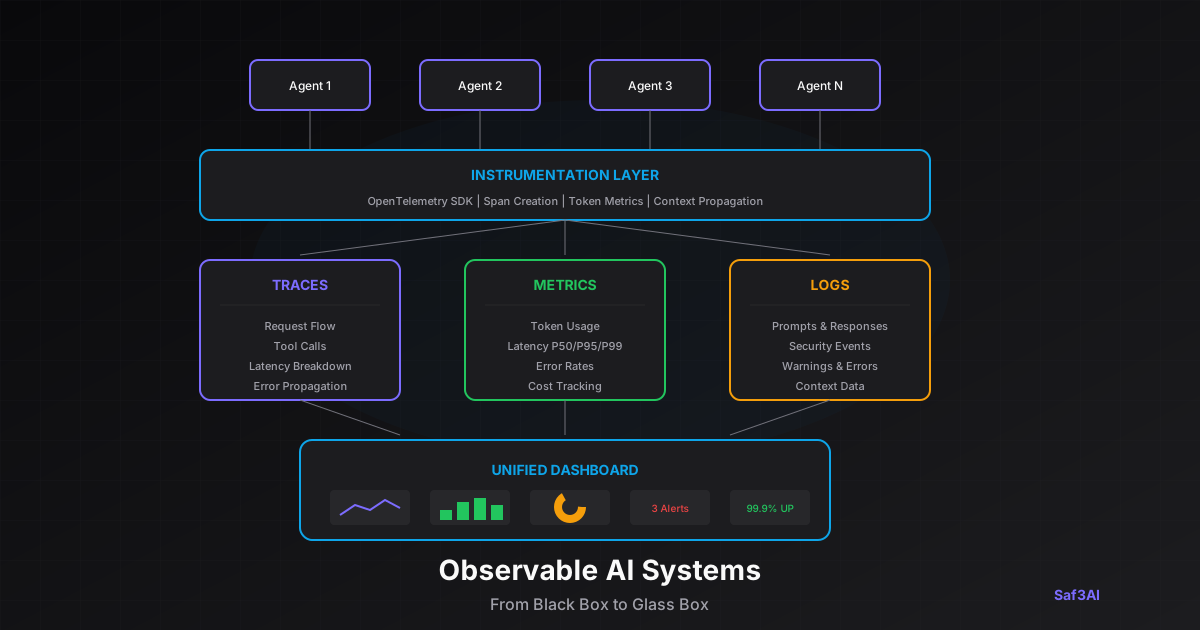
Traditional observability focuses on three pillars: logs, metrics, and traces. For AI systems, we need to extend this with a fourth pillar: model behavior monitoring.
Traditional Software vs. AI Systems
| Aspect | Traditional Software | AI Systems |
|---|---|---|
| Output | Deterministic | Non-deterministic |
| Errors | Clear error states | Subtle degradation |
| Failures | Known failure modes | Emergent failures |
| Debugging | Stack traces | Behavioral analysis |
The Four Pillars of AI Observability
1. Traces
Distributed tracing helps you understand the full request flow through your AI system:
What to Capture:
- Request lifecycle from start to finish
- Tool invocations and their parameters
- LLM API calls and latency
- Error propagation paths
- Context passing between components
Example Trace Breakdown:
user-request(2.4s total)input-validation(12ms)threat-detection(45ms)llm-call-1(800ms)tool-execution: web-search(600ms)llm-call-2(850ms)output-validation(35ms)
2. Metrics
Quantitative measurements that help you understand system performance:
Latency Metrics:
- Time to first token (TTFT)
- Total completion time
- P50, P95, P99 latencies
- Tool execution time
Usage Metrics:
- Token consumption (input/output)
- Cost per request
- Request volume
- Error rates
Quality Metrics:
- Response relevance scores
- Factual accuracy
- Task completion rates
- User satisfaction (CSAT)
3. Logs
Structured records of system activity for debugging and auditing:
Structured Log Example:
{
  "timestamp": "2025-10-22T14:32:15.123Z",
  "level": "INFO",
  "trace_id": "abc123",
  "service": "customer-support-agent",
  "event": "llm_response",
  "model": "gpt-4",
  "latency_ms": 780,
  "tokens": {
    "prompt": 450,
    "completion": 280
  },
  "cost_usd": 0.022,
  "quality_score": 0.89,
  "threat_detected": false
}
4. Model Behavior Monitoring
AI-specific monitoring that tracks behavioral patterns:
Security Monitoring:
- Threat detection rate
- Attack pattern breakdown
- Blocked vs. flagged requests
- False positive rates
Quality Monitoring:
- Response relevance over time
- Guardrail compliance
- Hallucination detection
- Drift detection
Alerting Strategy
Configure alerts at multiple severity levels:
| Severity | Condition | Response |
|---|---|---|
| Critical | Error rate > 10%, Latency P99 > 30s | Page immediately |
| High | Error rate > 5%, Quality drop > 15% | Page during business hours |
| Medium | Error rate > 2%, Cost spike > 150% | Slack notification |
| Low | Minor fluctuations | Dashboard only |
Implementation Best Practices
1. Instrument from Day One
Adding observability later is much harder. Build it in from the start:
- Use OpenTelemetry for standardized instrumentation
- Create spans for each logical operation
- Propagate context across service boundaries
- Include business-relevant attributes
2. Balance Detail with Privacy
Log enough for debugging, but protect sensitive data:
- Hash or redact PII in logs
- Store full prompts/responses separately with access controls
- Implement data retention policies
- Support GDPR/CCPA requirements
3. Set Meaningful Baselines
Establish what “normal” looks like for your system:
- Baseline response times by operation type
- Expected token usage ranges
- Normal quality score distributions
- Typical user behavior patterns
4. Avoid Alert Fatigue
Too many alerts leads to ignored alerts:
- Start with a few high-value alerts
- Tune thresholds based on actual incidents
- Group related alerts together
- Implement escalation policies
Dashboard Essentials
A good AI observability dashboard should show:
At a Glance:
- System health status
- Current error rate
- Active alerts
- Request volume
Detailed Views:
- Latency percentiles over time
- Token usage trends
- Cost tracking
- Quality scores
- Security events
Drill-Down Capabilities:
- Individual request traces
- Error analysis
- Slow query investigation
- Security incident details
Key Takeaways
- Instrument from day one - Adding observability later is much harder
- Track AI-specific metrics - Token usage, quality scores, threat detection
- Use distributed tracing - Essential for complex multi-step agents
- Set meaningful alerts - Too many alerts leads to alert fatigue
- Log prompts carefully - Balance debugging needs with PII concerns
Building observable AI systems isn’t optional—it’s a requirement for running AI in production safely and reliably.
Want comprehensive observability for your AI agents? Schedule a demo to see Saf3AI’s monitoring and alerting capabilities.